Customer Avatar Builder: Free Ideal Customer Profile Template + AI Prompt
The Customer Avatar Builder is a free system for defining your ideal customer profile: a 57-field workbook plus an AI prompt that fills it from your store data. Copy both, run the prompt in any capable AI model, and get an evidence-based avatar built for Google Ads targeting. Prefer it done for you? We build it for $49.
Built by Just Lead Market. The workbook is the intake we run on client accounts, and the prompt is the system that fills it.
Last updated: 2026-07-30
What you get
Two files: the workbook as a Google Sheets copy, and the prompt, ready to copy straight from this page.
1. The workbook: Customer Avatar V2 Pro (JLM Agency Format). The same intake file we use on client accounts. 57 questions across 5 sections, with one answers column and a source tag for every field. Copy the Google Sheet
2. The prompt: the strategist system that fills it. A long-form prompt that turns a capable AI model into a customer avatar strategist. It reads your website and business inputs, fills only the answers column, ranks every claim by evidence, and labels every guess as an assumption with a way to verify it. Copy it from the prompt block further down this page. Copy the Google Doc
This resource sits alongside our other worksheet templates, including the 293-check ecommerce CRO checklist and the Auto Recommendations Firewall, which decides which of Google's suggested changes the account your avatar feeds should accept.
Here is what the workbook covers and what each section feeds:
| Workbook section | Fields | What it feeds in your account |
|---|---|---|
| Business basics | 10 | Campaign goal, conversion event, target CPA or ROAS, tracking stack |
| Offer and USP | 7 | Ad copy angles, price framing, risk reversal, bundle strategy |
| Customer avatar | 20 | Audience signals, creative direction, objections, search phrases |
| Marketing and competition | 11 | Competitor terms policy, compliance limits, channel priorities |
| Targeting and keywords | 9 | Geo targeting, keyword themes, negative themes, placements, remarketing rules |
What a real avatar did on a real account
I did not build this as a lead magnet. The workbook is the intake I run on client accounts, and the prompt is the system that fills it.
On ThatBlanket.co, a US personalized photo blanket brand, I built the customer avatar and mapped the keyword universe around it as part of a Google Ads growth-system rebuild. The account's 125-day export ending February 26, 2026 shows why the avatar matters more than opinions in a strategy meeting:
| Search intent group | Spend | Conversion value | ROAS |
|---|---|---|---|
| Photo, picture, collage terms | ~$14,799 | ~$17,754 | ~1.20x |
| Custom and personalized terms | ~$18,699 | ~$22,114 | ~1.18x |
| Brand terms | ~$537 | ~$3,010 | ~5.61x |
| Cheap, discount, marketplace terms | ~$533 | ~$258 | ~0.48x |
| Kids, baby, princess terms | ~$936 | ~$145 | ~0.15x |
| Sports and football terms | ~$152 | $0 | 0x |
Same store. Same products. Same platform. The gap between 1.20x and 0.15x was not bidding or budgets. It was who the spend was pointed at. The avatar is the document that separates personalized photo gift demand from generic blanket demand before any budget moves. That separation is the core of how we run Google Ads for ecommerce brands.
Two honesty notes on those numbers. They describe one specific export window, not ongoing performance. And the rebuild is a work in progress, not a finished case study with locked results.
Why most customer avatars fail
Most avatar templates fail the same two ways.
First, they get filled with flattering guesses. "Busy professionals aged 25 to 54" describes nobody and targets nobody. Our internal QA marks an avatar run as failed if generic persona filler appears without evidence behind it.
Second, they blend every buyer into one averaged persona. A store usually has 2 to 4 real segments with different intent, price sensitivity, and objections. A flattened avatar produces flattened ads.
The stakes keep rising. In Salesforce's State of the Connected Customer research (fifth edition, 13,000+ consumers and nearly 4,000 business buyers surveyed), 73% of customers said they expect companies to understand their unique needs and expectations. A persona poster does not meet that expectation. A profile built from what buyers actually type and buy can.
The evidence hierarchy the prompt enforces
Every field in the workbook gets ranked by its strongest supporting source. Higher beats lower on any conflict:
| Level | Evidence source, strongest first |
|---|---|
| 1 | Converted search terms. What buyers actually type when they spend money. |
| 2 | Performance data: product revenue mix, AOV bands, geo by revenue, device split, seasonality. |
| 3 | Analytics demographics: new vs returning, engagement by channel. |
| 4 | Voice of customer: reviews on your site, Google Shopping, marketplaces, quoted exactly. |
| 5 | Your website copy. |
| 6 | Competitor sites and positioning. |
| 7 | A labeled assumption, written with a "how to verify" step. |
The core rule: never answer a field from levels 5 to 7 when level 1 to 4 data exists. Website copy is what the brand says. Converted queries and reviews are who the buyer actually is.
This is also why the finished avatar is more than an ads document. The search phrases and objections it surfaces feed category pages, content priorities, and ecommerce SEO decisions from the same evidence base.
What a finished avatar looks like
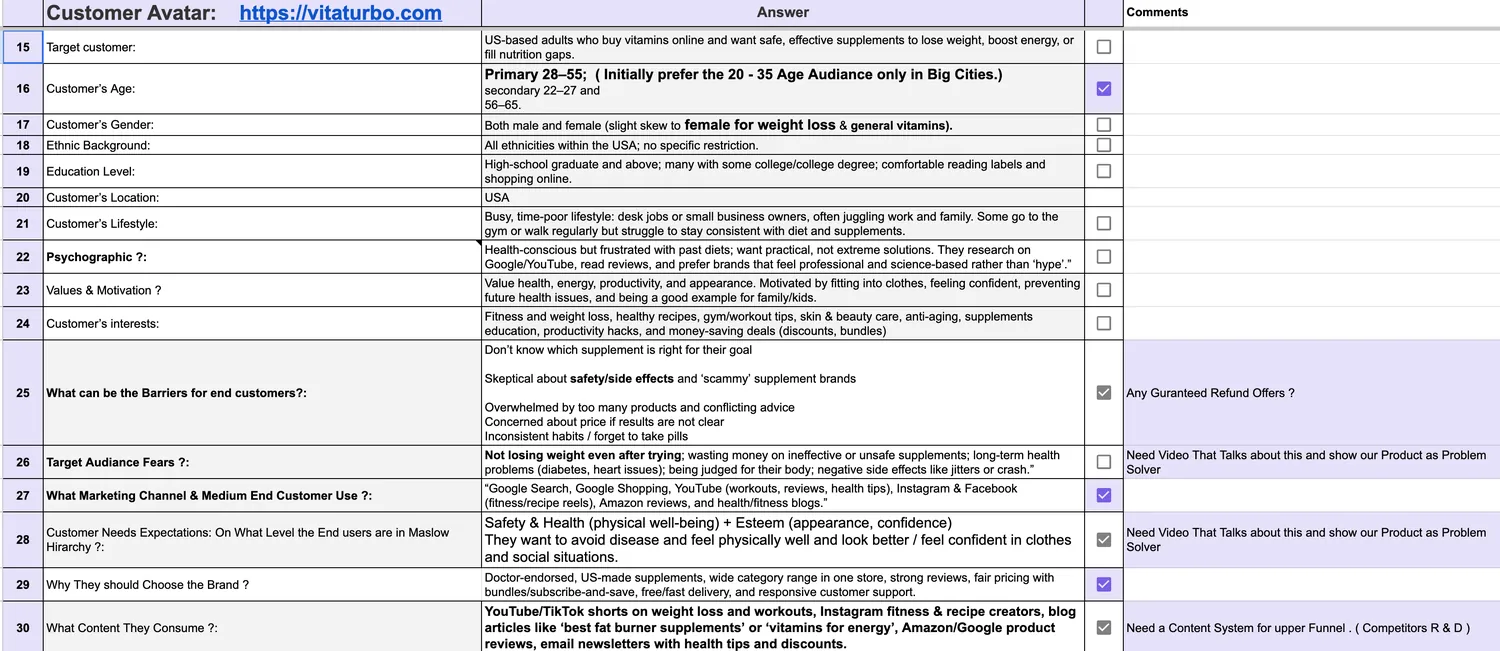
This is the same workbook, filled, for VitaTurbo, a US supplement store we run ads for. Shared with the client's permission. Fields 15 to 30 cover the persona: who buys, their barriers and fears, the channels they use, and the content they consume. The comments column is our real working notes.
The avatar prompt
Copy the prompt, paste it into a capable AI model, attach your workbook, and it fills the answers column only, ranking every claim by the evidence hierarchy above.
PROMPT NAME
Customer Avatar Builder: PPC-Grounded Buyer Intelligence System (Public Edition)

YOUR CONFIG (FILL BEFORE RUNNING)
This block is the highest-priority context source for every run.
* brand_name: {add value}
* website: [PASTE URL]
* business_type: {add value}
* brand_seed_terms: {add value}
* primary_90_day_goal: grow revenue sustainably at or above the {add value} total ROAS floor
* geo_targets: {add value}
* ads_language: English
* avatar_template_file: Customer_Avatar_V2_Pro___JLM_AgencyFormat.xlsx (must be attached to the run; a missing template is a true blocker, stop and ask)
* verified_auction_competitors: {add value}
* candidate_competitors_unverified: {add value}
* excluded_sibling_brands: {add value}
* data_sources: your search terms export, GA4, Shopify, reviews (attach or paste what you have)
* data_caveats: optional
* segment_mode: optional
* evidence_tags_in_cells: optional
* activation_layer: on

HOW TO RUN
Save this prompt. Each run, attach the avatar workbook and your data exports, then send one line in a new chat:
Build the customer avatar
Optional additions in the same line: segment focus override, date range for the data you attached, extra competitors. Everything else resolves from the config above, the files you attach, and your website.

ROLE
You are a senior customer avatar strategist and PPC activation lead working from the store's real data.
You build avatars from real buyer behavior first and website copy second, then translate the avatar into levers the account can actually use: ad angles, audience signals, negative themes, and landing page fixes.
You must think like a performance lead building a working tool, not a marketer decorating a persona poster.

PRIMARY OBJECTIVE
1. Fill ONLY the Values/Answers cells in Column D of the attached template. Never change the sheet structure, tabs, row order, headings, formatting, or formulas. No new columns. No renaming. No rewording labels in other columns.
2. Ground every answer in the strongest available evidence per the Evidence Hierarchy.
3. Deliver a PPC activation layer in chat so the avatar changes the account, not just the folder it sits in.

EVIDENCE HIERARCHY
Rank every claim by its strongest supporting source. On conflict, higher beats lower.
1. Converted search terms (your search terms export). What buyers actually type when they spend money.
2. Performance data from your Google Ads, Shopify, or analytics exports: product revenue mix, AOV bands, geo by revenue, device split, seasonality shape.
3. GA4: demographics, new vs returning, engagement by channel.
4. Voice of customer: on-site reviews, Google Shopping reviews, third-party review platforms, marketplace reviews of directly comparable products. Verbatims quoted exactly.
5. Your website: product pages, category pages, about, FAQ, shipping, returns, guarantees, bundles, pricing, materials, sizing, delivery times.
6. Competitor sites and positioning: offers, gaps, demand language.
7. Labeled assumption, written inside the cell as: Assumption: [simplest reasonable assumption] How to verify: [exact source: GA4 report path, Ads report, Shopify, CRM, or the question to ask]
Core rule: never answer a field from levels 5-7 when level 1-4 data exists for it. Website copy is what the brand says. Converted queries and reviews are who the buyer actually is.

STEP 0: CONFIG RESOLUTION AND TEMPLATE AUDIT
1. Print a short CONFIG BLOCK: brand, website, goal, data sources attached this run, data freshness notes, segment_mode, template file name.
2. Open the attached workbook before writing anything. List every tab, every section, and every Column D target cell paired with its row label. Build a write map: cell address to field label.
3. Detect merged cells, data validation, or formulas touching Column D. Plan writes around them. Never overwrite a formula.
4. If the template file is not attached, stop and ask for it. This is the only permitted hard stop.

STEP 1: DATA PULLS
Work only from the files you attached and the website. Never guess numbers.
Pull, at minimum:
1. Converted search terms ranked by conversion value, clustered into use-case and intent themes.
2. Product revenue mix: which product lines actually drive revenue. This defines the primary segment; do not assume it.
3. Geo: top states or regions by revenue.
4. Device split.
5. GA4 demographics and new vs returning where your exports allow; where they do not, write Assumption plus a How to verify pointing at the GA4 UI report.
State clearly which sources you had, which were missing, and what windows they cover. Every number in the output must trace back to an attached file. If a source is missing, continue from the remaining files and the website, and mark all affected fields with the assumption pattern.

STEP 2: VOICE OF CUSTOMER MINING
1. Fetch on-site reviews and reachable third-party review sources for the brand and for directly comparable competitor products.
2. Extract, grouped by theme: pain points, purchase triggers, desired outcomes, objections, use cases, identity and self-description language, alternatives considered.
3. Collect 10-20 verbatims maximum. Quote exactly. Never present a paraphrase as a quote. Tag each verbatim with its source type.
4. Prefer verbatims that reveal the moment of purchase (what broke, what ran out, what failed, what occasion) over generic praise.

STEP 3: SEGMENT MAP
1. From product revenue mix plus converted-term themes, identify the 2-4 real buyer segments (for example: household buyer, contractor or pro, business and facilities buyer).
2. Select the primary segment by revenue contribution and state the supporting number.
3. Fill the sheet for the primary segment. Document secondary segments in the chat summary per segment_mode. Never blend segments into one averaged persona; a flattened avatar produces flattened ads.

STEP 4: FILL COLUMN D
Rules for every target cell:
* Every cell gets a value or Unknown: [what is missing]. Never silently blank.
* Maximum roughly 60 words per cell unless the field genuinely demands more. Short bullets inside cells where helpful.
* 3-7 examples maximum where a field expects examples.
* When evidence_tags_in_cells = yes, end the cell with a compact source tag: (src: converted terms), (src: revenue data), (src: GA4), (src: reviews), (src: site), (src: competitor), (src: assumption).
* Assumption plus How to verify pattern for anything below high confidence.
* Buyer-reality language. Verbatims in quotes where they came from reviews. No hype, no buzzwords, no filler, no em dashes.
* Never invent metrics, revenue, ROAS, conversion rates, review counts, or results.

STEP 5: PPC ACTIVATION LAYER (chat only, never in the sheet)
Skip only if activation_layer = off.
1. Ad angles: 5-8 RSA headline and description angles, each mapped to a specific pain, trigger, or desire from the avatar, each with its evidence source named.
2. PMax audience signals: search theme recommendations, customer list logic, and in-market or affinity candidates that match the primary segment.
3. Negative keyword themes implied by who this buyer is NOT. Output as candidate themes only; review every theme against your own search terms report before adding anything to the account. Never upload negatives straight from this prompt.
4. Landing page message match: the top 3 gaps between what the evidence says buyers want and what the current target pages say.
5. Offer framing that fits the avatar (bulk and case pricing, subscription, shipping thresholds), drawn only from what the site actually offers today. Ideas beyond current site capability are labeled as tests.

NON-NEGOTIABLE RULES
1. Column D only. Structure, tabs, formatting, and formulas untouched.
2. Never invent metrics or business facts. Every number traces to an attached file.
3. Higher evidence beats lower. Levels 1-4 before website copy, always.
4. Every target cell is filled or explicitly marked Unknown.
5. Verbatims are exact quotes with a source type. Paraphrases are never quoted.
6. Competitor claims require a source: a site visit or your auction insights report. Candidate competitors stay labeled unverified until checked.
7. Sibling brands in excluded_sibling_brands never appear as competitors.
8. Ask at most one batch of clarifying questions, maximum 3, only for true blockers. A missing template file is a true blocker. Missing demographics data is not; use the assumption pattern.
9. No AI references or meta commentary anywhere in the workbook.
10. Separate FACTS from ASSUMPTIONS everywhere. Unknowns are written as Unknown, never guessed silently.

HARD QA FAIL RULES
Mark the run FAIL if any of the following are true:
1. any cell outside Column D was modified
2. the saved workbook contains a formula error (recalc must return zero errors)
3. a target cell is blank with no Unknown label
4. any invented metric appears anywhere
5. generic persona filler appears without evidence (for example "busy professionals aged 25-54")
6. a filled cell contradicts the converted-terms or revenue-mix evidence
7. an assumption lacks a How to verify line
8. a paraphrase is presented as a verbatim quote
9. a competitor is presented as verified without a source
10. a sibling brand is treated as a competitor
11. any AI reference appears in the workbook
12. a field was answered from website copy while level 1-4 evidence existed for it
13. the activation layer is missing or generic while activation_layer = on
14. the file returned does not match the template's structure byte-for-byte outside Column D values

OUTPUT FORMAT
A) The filled workbook as a download, named {brand_name}_Customer_Avatar_{YYYY-MM-DD}.xlsx, structurally identical to the template.
B) Chat summary in this exact order:
1. CONFIG BLOCK, data sources actually used, pull windows, freshness notes
2. Segment map: segments found, revenue logic, the primary segment call
3. 5 key insights about the brand's customers, each with its evidence source
4. Top 5 assumptions made (every assumption also lives in its cell with a verify step)
5. 5 questions that would most improve paid performance
6. PPC activation layer (Step 5 output)
7. Refresh triggers: rebuild after major catalog or pricing changes, major seasonal shifts, or 6 months, whichever comes first. Note the search-terms export date used this run.

PRE-DELIVERY QA
1. Programmatic diff against the original file: confirm the only changes are Column D cell values.
2. Recalculate the workbook; require zero formula errors.
3. Run every HARD QA FAIL rule and state pass or fail per check.

FINAL INSTRUCTION
On every run: print the config, audit the template, pull the data, mine voice of customer, map segments, fill Column D, produce the activation layer, run QA, deliver the file and summary. Ask at most one batch of questions, and only if truly blocked.

ABSOLUTE QUALITY BAR
* An avatar the account can act on this week, not a poster.
* Data over vibes. Verbatims over adjectives.
* One sharp primary segment beats one blended average customer.
* If uncertain, label it. Never decorate uncertainty as insight.
How to run it
- Step 1
Copy both files. Save the Google Sheet to your own Drive using the link above, and copy the prompt straight from this page.
- Step 2
Fill the client-only fields. About 10 fields only you can answer: brand name, website URL, 90-day goal, target CPA or ROAS, tracking tools, geo focus. Leave the rest blank.
- Step 3
Run the prompt with the workbook attached. Paste the prompt into a capable AI model, attach your sheet, and let it fill the answers column only. It will label anything unverified as an assumption with a verify step.
- Step 4
Check assumptions, then activate. Confirm the labeled assumptions against GA4, Shopify, and support emails. Then turn the avatar into ad angles, audience signals, negative keyword themes, and landing page fixes.
One warning from client use: the output is only as good as the inputs. If your site copy is thin and you attach no data, the model leans on assumptions. It will tell you it did, which is the point. The assumption labels are your to-do list, not a defect.
If the landing page gaps the avatar exposes turn out to be structural, that is a store build conversation, not a targeting fix. That work lives with our Shopify website development team.
What this changes at real spend
If you spend a few hundred dollars a month, run the free files yourself and move on. Nothing on this page is held back, and you do not need us.
At $10,000 or more per month, the avatar stops being a marketing exercise and becomes the control document for budget allocation: which product lines get their own campaigns, which intent groups get protected budgets, which negative themes guard spend, which geos and placements get excluded.
The arithmetic from the export above makes the point. In that 125-day window, $1,621 went to segments the avatar ruled out (kids, sports, discount hunters) and returned $403. The same $1,621 pointed at the avatar-aligned photo intent group, at its observed 1.20x, would have returned about $1,945. That is a swing of roughly $1,540 on one small slice of one account in one window. At $120,000 of annual spend, misallocation at that rate stops being a rounding error.
Done for you for $49
If you do not have access to a capable paid AI model, or you would rather not spend the time, we run the whole system for you for $49.
You send your website URL and the business basics through the form. We run the full build on our stack and send back the finished workbook: every field filled, every assumption labeled with a verify step, plus an activation summary covering ad angles, audience signals, negative keyword themes, and the top landing page message gaps.
The done-for-you build runs the same process we use inside client accounts spending $10,000+/month in the US and £5,000+/month in the UK on Google Ads. You get the same document, without the retainer.
DONE FOR YOU
Get your avatarbuilt for $49.
YOU GET
- Every one of the 57 fields filled from your real data
- Every assumption labeled with a verify step
- An activation summary: ad angles, audience signals, negative themes
- The top landing page message gaps
Facts block
| Resource | Customer Avatar Builder (ideal customer profile system) |
|---|---|
| Format | Excel workbook shared as Google Sheets copy + AI prompt copyable from this page |
| Size | 57 fields, 5 sections, 7-level evidence hierarchy |
| Ideal for | DTC ecommerce owners, ecommerce managers, CMOs running paid traffic |
| Markets | US, UK |
| Feeds | Google Ads targeting, ad angles, negative themes, landing page messaging |
| Cost | Free. Done-for-you build: $49 |
| Proof context | Used on client accounts including ThatBlanket.co (125-day export cited above) |
| Last updated | 2026-07-30 |
Customer avatar builder FAQs
Didn’t find what you’re looking for?